
How I Organize My Google Classroom for Algebra (Lesson by Lesson)
“It took me years — and a lot of trial and error — to stop overcomplicating my Google Classroom and land on a system that actually works.”
If you’re a new teacher — or a student teacher gearing up for your own classroom for the first time — figuring out your Google Classroom organization can feel like one more overwhelming decision on top of a hundred others. I get it. I’ve been teaching Algebra for almost 30 years, and my Google Classroom organization has gone through several versions before I landed on the one I actually use every single day now.
For years, I organized everything by textbook chapter: Chapter 1, Chapter 2, Chapter 3. Then I tried to get more specific and switched to a section-based system — 3-1, 3-2, 3-3, 4-1 — thinking it would make things clearer. It didn’t. It just meant more renumbering every time the pacing shifted, a new state standard came in, or I reordered a unit.
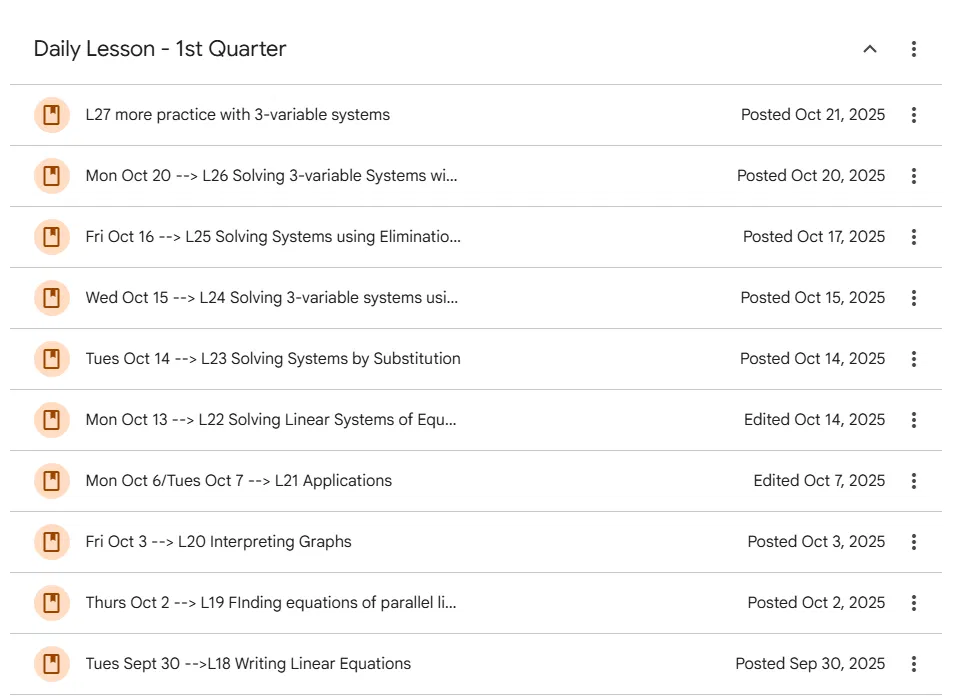
About four or five years ago, I switched to the system I still use today: Lesson 1, Lesson 2, Lesson 3 — straight through to the end of the semester, landing around Lesson 40. No chapters, no sections, no renumbering. Just a running list that keeps moving forward.
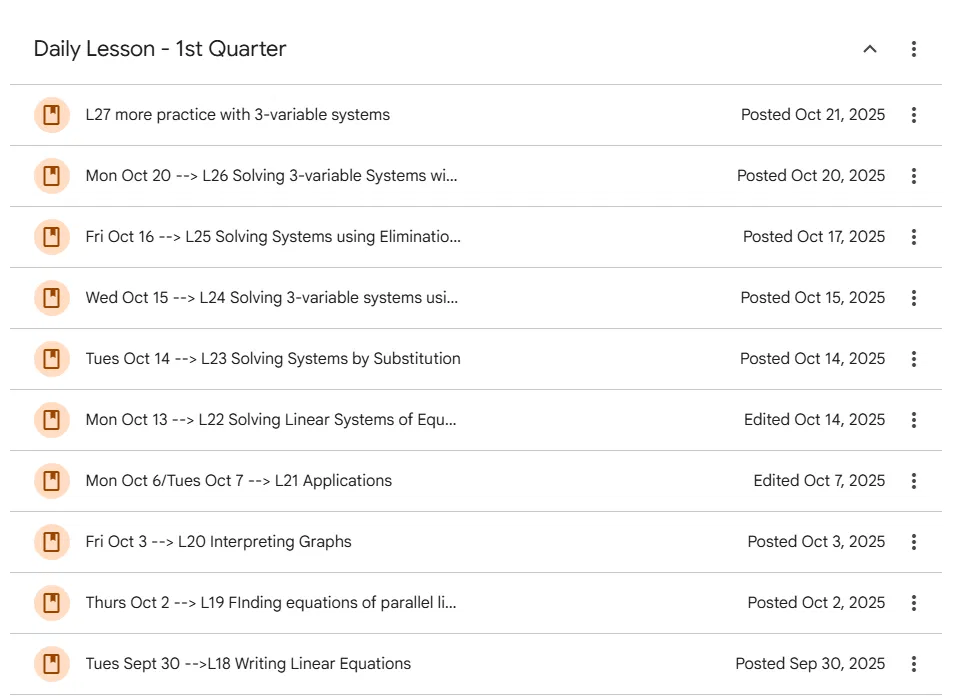
My Daily Lesson list — every lesson posted in order, no chapter numbers to keep track of.
What’s Inside My Google Classroom Organization, Lesson by Lesson
Once a lesson topic is posted, here’s what students find inside it:
- A video for any student who was absent, so they can see exactly what happened in class
- A blank copy of the notes I worked through that day — some of my students with iPads like to pull this into an app like Microsoft OneNote and write on it themselves, right alongside me
- A completed copy of the same notes, fully worked out, for students who just need to see the finished version
- The homework for that lesson
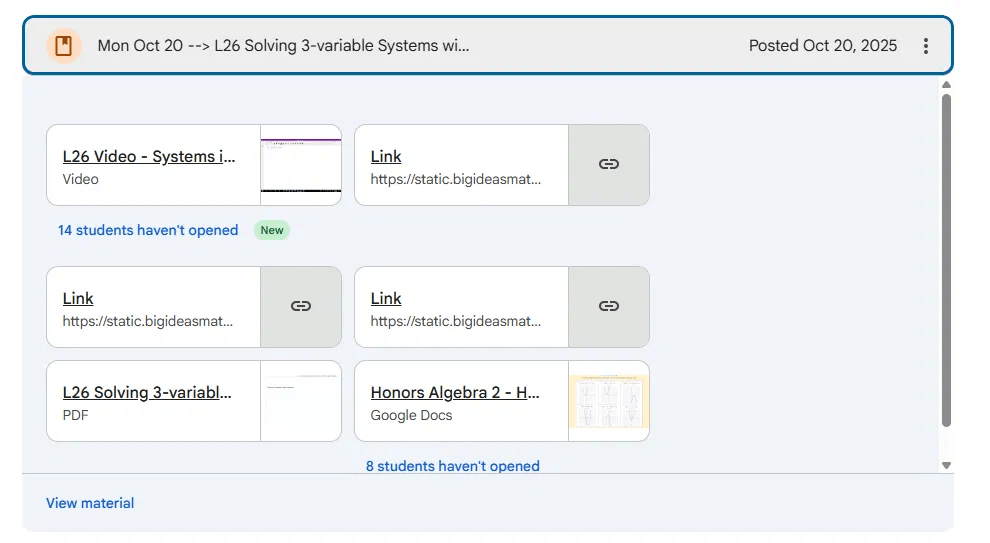
Everything a student needs for one lesson — video, notes, and homework — all in one place.
This structure means I’m never digging through a textbook trying to remember “wait, what part of the chapter was this again?” It’s just Lesson 1 through Lesson 40, in order, every semester.
Why I Label Everything the Same Way
This part I actually learned from someone else’s classroom — my son’s precalc teacher, of all people. When my son was in precalc, his teacher uploaded videos and notes to Google Classroom too, but she labeled everything by date only. Nothing else.
My son wasn’t great about writing down what topic was covered on a given day — like a lot of teenagers, he’d just show up, take notes, and move on. So when it was time to prep for a test and he needed to find the notes on a specific topic, we couldn’t. We had to click into every single date, one at a time, scanning for the right one, until we finally found what we needed.
That frustration taught me something I now build into every lesson I post: label by date and lesson number and topic, every time. Something like “Mon Oct 20 → L26 Solving 3-Variable Systems.” That one label change covers three different ways a student might be looking for something — by date, if they’re the type who remembers “it was the Monday before fall break”; by lesson number, if they missed L23 and a friend told them what to catch up on; or by topic, if they just know they need help with solving systems by substitution and don’t remember when it happened.
And inside each lesson, everything gets the exact same naming pattern, every time: L21 Blank Notes, L21 Completed Notes, L21 Video, L21 Homework. Nothing is ever named something different just because I was in a hurry that day. That consistency is what makes the whole system actually work — students learn the pattern once and can find anything from any lesson without having to think about it.
I never got the chance to tell that teacher how much her one small flaw taught me, but it completely shaped how I’ve labeled things ever since.
The One Trick That Changed Everything: A Running Homework Doc
This is the piece that gets the most questions when other teachers see my Classroom. Instead of posting a separate homework assignment every single day, I keep one running Google Doc for the entire semester’s homework.
Each entry has the date, then a screenshot of the actual problems — whether that’s a photo of the page from our textbook or a screenshot of a worksheet. Every class day, I just add the next entry to the bottom and keep going. That means a student who was out sick can open one document and scroll to see every single assignment from the whole semester — what it was, what the problems looked like, and when it was due.
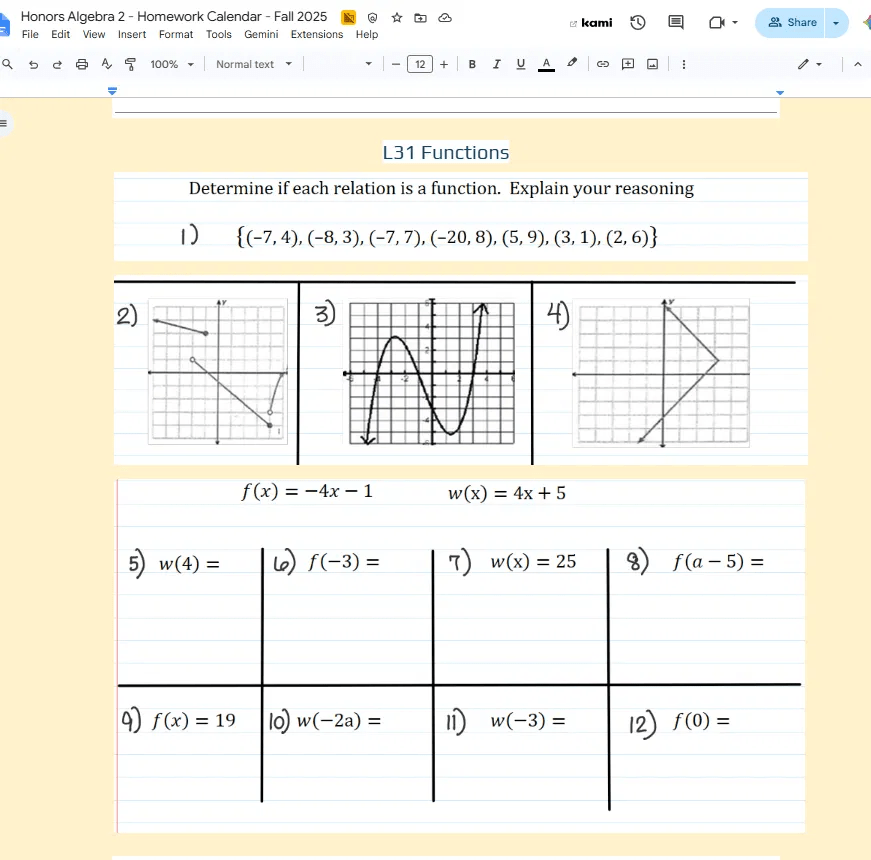
A sample entry from my running homework doc — this one’s L31 Functions, straight from the running doc I keep all semester.
I also started marking assignments as late-and-not-accepted once the window closes, right in that same doc. It sounds small, but it gives students a clear visual cue: this one’s not worth trying to turn in anymore. No more guessing, no more “can I still turn this in” emails three weeks later.
Since I started building my digital activities in Google Slides, this running doc also became the natural home for linking those assignments — students already know to check there for anything they need for that lesson.
One More Tip: Co-Teachers vs. Paraprofessionals
If you work with gifted teachers, special education teachers, or paraprofessionals, this one’s worth knowing. I add gifted and special ed teachers as co-teachers in the course, which gives them full access to open any notes or video they need when they’re supporting a student — no waiting on me, no extra emails. I also add paraprofessionals and students as regular class members, so they have the access they need too.
What I’ve learned not to do is add paraprofessionals as co-teachers. It’s not a knock on them — most paras just haven’t had the same training on Google Classroom’s permission structure that teachers have, and co-teacher access opens up editing rights they may not realize they have.
I learned this one the hard way. A para was working through a digital activity one-on-one with her student and, without realizing it, was typing the correct answers directly into the original Google Slides file instead of the student’s individual copy. By the time anyone noticed, every student who hadn’t opened the activity yet was opening a version that already had the answers filled in. Oops, indeed. Now paras go in as students, not co-teachers, and that problem hasn’t happened again.
Two Things I Still Haven’t Fully Solved
I’ll be honest — this system isn’t perfect, and I don’t want to pretend it is.
The early finishers. I have plenty of students, especially in my Honors Algebra classes, who are juggling several high-pressure classes. If they get a free moment, they’ll log in and work ahead — which means some of them would walk into my room already finished with the day’s lesson before we’d even started. My fix so far: instead of releasing the day’s materials first thing in the morning, I release them about ten minutes before class starts. It’s cut down on the “already done” problem significantly, though it hasn’t eliminated it entirely.
The notes-as-a-crutch problem. Having the notes available digitally is genuinely helpful for students who have trouble seeing the board — they can pull them up on a laptop and follow along in real time. But it’s created a different issue: when I pose a question and wait for students to work through it, some of them already have the answer sitting right in front of them on the notes doc, so they don’t bother attempting it themselves. I haven’t found a clean solution to that one yet — if you have, I’d genuinely love to hear it in the comments.
If you’re heading into a new school year trying to figure out your own Classroom organization, you don’t need it to be perfect on day one.
Mine sure wasn’t — it just needed to keep evolving until it actually worked for my students.
Related: Walk-Around Activity — The Format I Use in Every Algebra Unit
Related: Algebra 2 — End of Semester Project